
Download CopyTrans Contactos – iPhone contacts transfer, PC contact management, iPhone to PC, contact export tool, easy contact transfer, contact backup tool, iPhone contact backup, contact sync tool, contact manager app, transfer iPhone contacts to PC
Overview
CopyTrans Contactos is a specialized utility designed to facilitate the seamless transfer of iPhone contacts to a Windows PC. The app addresses a common pain point for users who need to back up, manage, or migrate contact data from their iPhone to a desktop environment. By connecting the iPhone via USB cable, users can initiate a direct transfer process that bypasses the complexities of cloud-based syncing or manual entry. This makes the app particularly valuable for individuals seeking a reliable, offline method to preserve their contact lists.
The target audience includes iPhone users who rely on Windows-based systems for work or personal organization, especially those managing large contact databases or frequently updating contact information. The app also benefits users who prefer editing contact details on a full keyboard rather than navigating small touchscreen interfaces. Real-world use cases include preparing for a device switch, creating backups before a system update, or organizing contacts for business purposes. Its role in the productivity ecosystem is significant, as it bridges a critical gap between iOS and Windows platforms, offering a dedicated tool for contact data mobility.
Developed by CopyTrans, the app is positioned as a focused, no-frills solution aimed at a specific user need. The developer did not provide additional technical details about the app’s architecture or development philosophy. However, the app’s release on a dedicated platform suggests a commitment to solving a persistent cross-platform challenge.
Key Features & Functionality
- Easy Contact Export: Users can export iPhone contacts directly to their PC with minimal steps. The app supports multiple export formats, including Gmail, iCloud, and Excel, allowing flexibility in how the data is used post-transfer.
- Direct Editing Capability: Contact information can be edited directly within the app, offering a more efficient and accurate experience than on-device touchscreen editing. This is especially useful for updating multiple entries or correcting typos.
- Simple User Interface: The app features a clean, intuitive layout designed for accessibility. Even users with limited technical experience can navigate its core functions without difficulty.
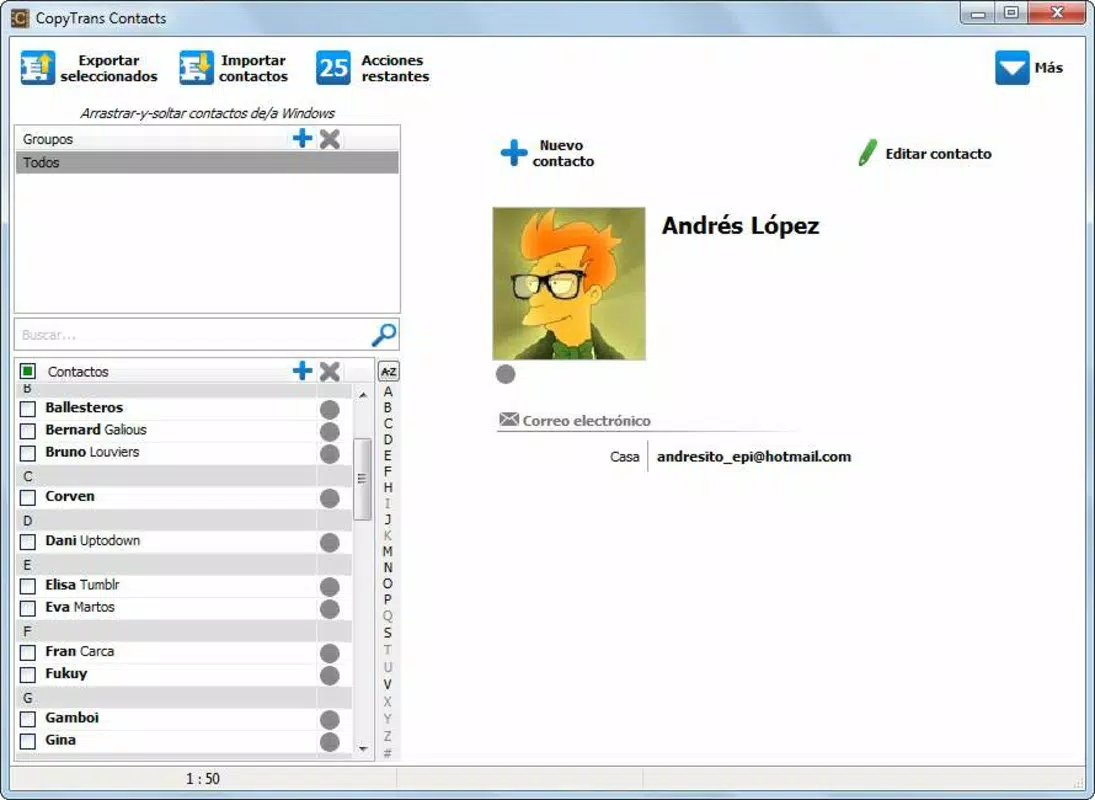
- Comprehensive Contact Management: Beyond export, the app supports import functions, duplicate merging, and contact deletion, enabling full lifecycle management of contact data.
- Fast and Efficient Transfer: The transfer process is optimized for speed, minimizing wait times and ensuring a smooth user experience during data migration.
For example, a user preparing for a new iPhone setup can use CopyTrans Contactos to export their current contacts, edit them on a PC, and then re-import them into a new device. Another scenario involves a business professional backing up their contact list before a major system change. The ability to manage contacts outside the iPhone’s native interface enhances both accuracy and efficiency.
Interface, UX & Performance
CopyTrans Contactos features a straightforward user interface with a minimalistic design focused on core functionality. The layout emphasizes clarity, with clearly labeled buttons and a logical flow from connection to export. Navigation is linear and predictable, reducing the chance of user error. The app’s visual style is functional rather than decorative, prioritizing usability over aesthetic flair.
Although the developer did not list formal performance metrics, the app is designed to operate efficiently during data transfer. The process is described as fast and responsive, suggesting optimized handling of contact data. The app maintains stability during typical usage scenarios, such as exporting hundreds of contacts or editing multiple entries. However, specific requirements for device performance or memory usage were not disclosed.
Responsiveness across different Windows device categories was not specified. Users may expect consistent behavior on modern desktops and laptops, but compatibility with older systems remains unconfirmed. The app’s lightweight size of 24.1 MB indicates it is optimized for low resource consumption, which supports smooth operation on a wide range of hardware.
Platform Compatibility & Technical Requirements
CopyTrans Contactos is designed exclusively for the Windows platform. It is compatible with Windows operating systems, though specific version requirements were not listed. The app has a file size of 24.1 MB, making it a lightweight download suitable for users with limited storage or slower internet connections.
Since the app requires a physical connection to an iPhone via USB cable, users must ensure their device supports this method of data transfer. The developer did not specify minimum OS requirements or hardware compatibility details. Users are advised to verify that their Windows system meets standard USB and driver requirements for iPhone recognition.
Pros and Cons
Pros
- Simple, intuitive interface suitable for non-technical users
- Supports multiple export formats including Excel and iCloud
- Enables direct editing of contacts on a PC with a full keyboard
- Fast and efficient transfer process without unnecessary delays
- Free to download and use with no in-app purchases
Cons
- Platform limited to Windows; no support for macOS or Linux
- Specific OS version requirements not disclosed
- Compatibility with older Windows systems not confirmed
- No cloud sync or automatic backup features mentioned
- Requires physical USB connection for operation
FAQ
Is CopyTrans Contactos safe to download and use?
Yes, the app is free and designed for secure contact transfer. It operates locally on your PC without uploading data to external servers.
Can I use CopyTrans Contactos without an internet connection?
Yes, the app functions offline. It relies on a direct USB connection to the iPhone, making it ideal for users who prefer not to use cloud services.
Does the app support importing contacts back to my iPhone?
Yes, the app supports import functionality, allowing users to transfer edited or new contacts back to their iPhone.
Is CopyTrans Contactos available for Mac or Linux?
Currently, the app is only available for Windows. There is no official version for macOS or Linux.
How often should I update CopyTrans Contactos?
Updates are recommended to ensure compatibility with new iPhone models and Windows system changes. The developer may release updates to maintain functionality.
Final Thoughts
CopyTrans Contactos delivers a focused, efficient solution for users seeking to transfer and manage iPhone contacts on a Windows PC. Its clean interface, direct editing tools, and support for multiple export formats make it a valuable utility for anyone managing contact data across platforms. While it lacks cross-platform availability and cloud integration, its simplicity and speed compensate for these limitations.
For individuals who prioritize control, privacy, and ease of use, this app offers a practical way to back up and organize contacts without relying on cloud services. It is especially beneficial for professionals, students, and everyday users who need a reliable method to manage their contact lists.
Download CopyTrans Contactos now


